 Numa
NumaFor iPhone and iPad
Change a number. Everything follows.
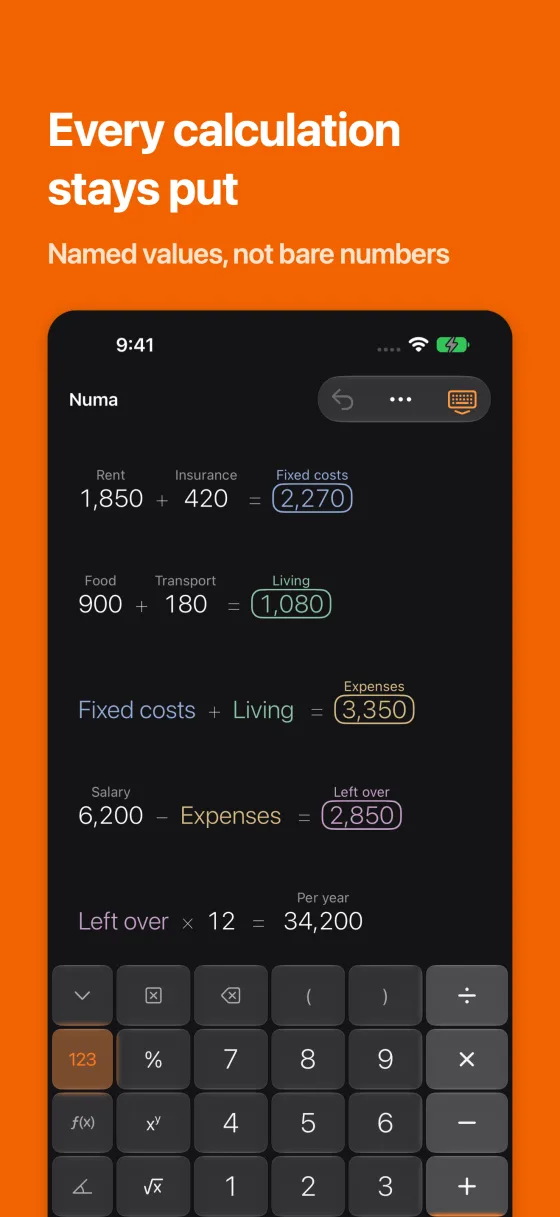
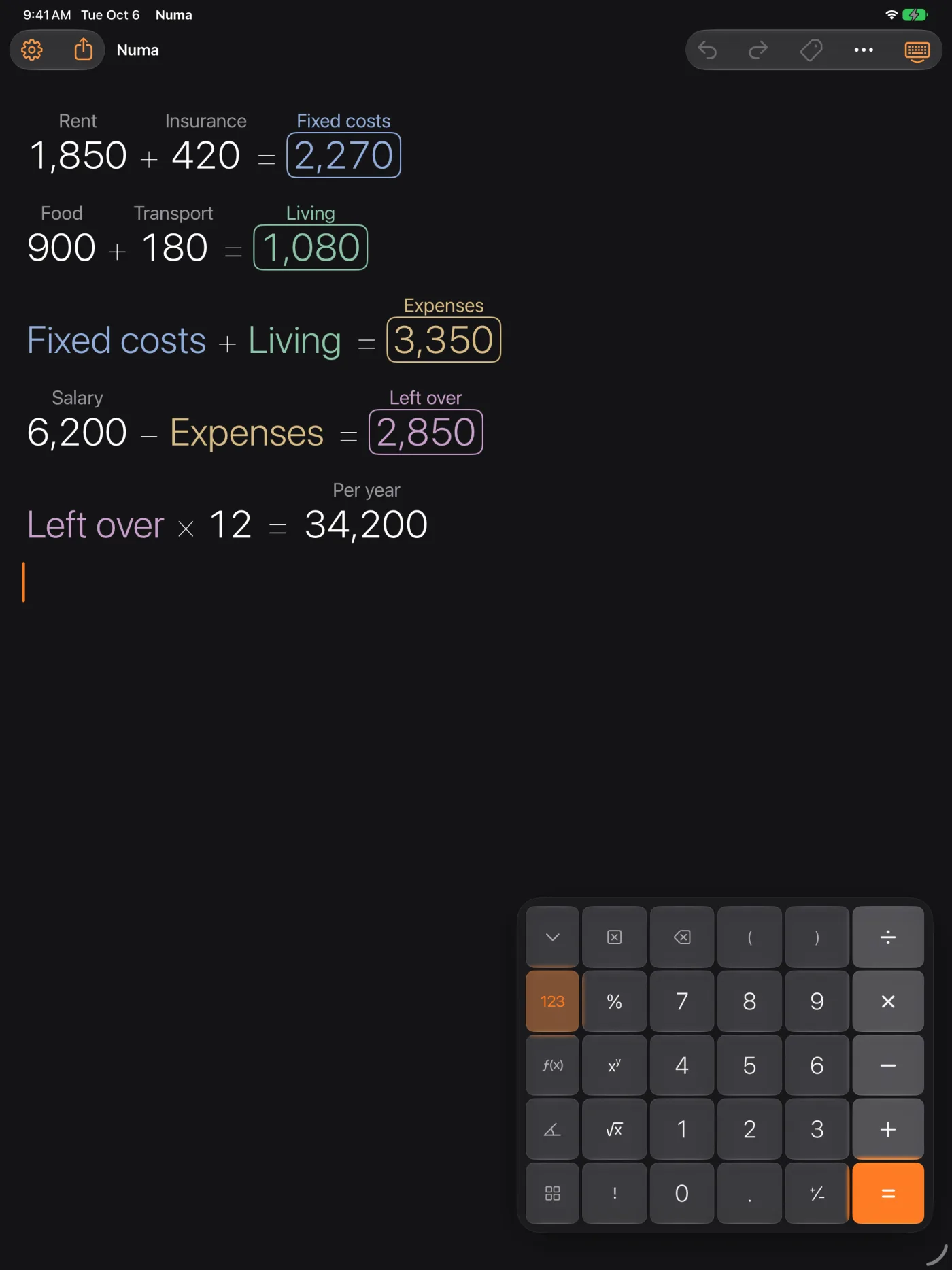
In Numa, every calculation stays on an infinite canvas. Link results together, change a value, and everything that depends on it is right again instantly.
No account. No ads. No tracking.
See Numa in action
How it works
Calculate
Type a calculation. It stays on the canvas with its result.
Link
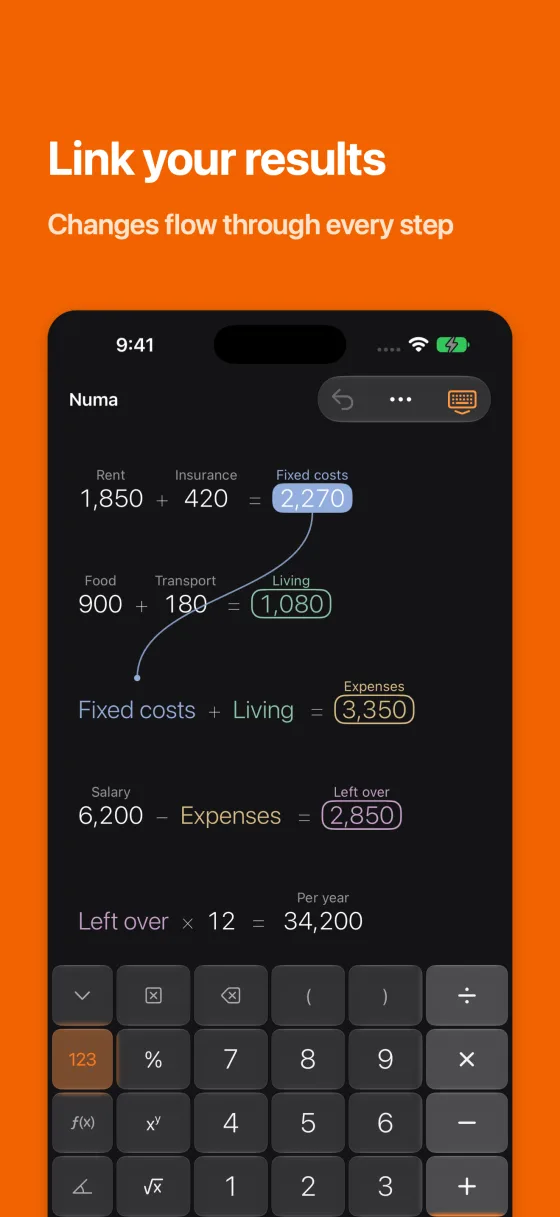
Select a result and press an operator. A linked number appears below it in its own colour. Or drag one number onto another.
Change
Change a number by hand or with the slider. Every linked result updates instantly, through as many steps as you like.
Features
What Numa can do, at a glance.
Infinite canvas
- Every calculation stays in view
- Change a number and every result updates instantly
- A label above any number, like a spreadsheet but freer
- A slider on any number, smooth or in whole numbers
- Undo and redo
Linked values
- Select a result, press an operator: the linked number appears on the line below
- Or drag one number onto another
- Changes flow through any number of steps
- Each linked value gets its own colour
- Touch and hold to open the menu: Copy, Paste, Link, Unlink, Label, Slider, Graph, Unit, Scenarios, Delete
Names and scenarios
- Use labelled numbers as names: Rent × 12
- Links can show the name of their source if you like
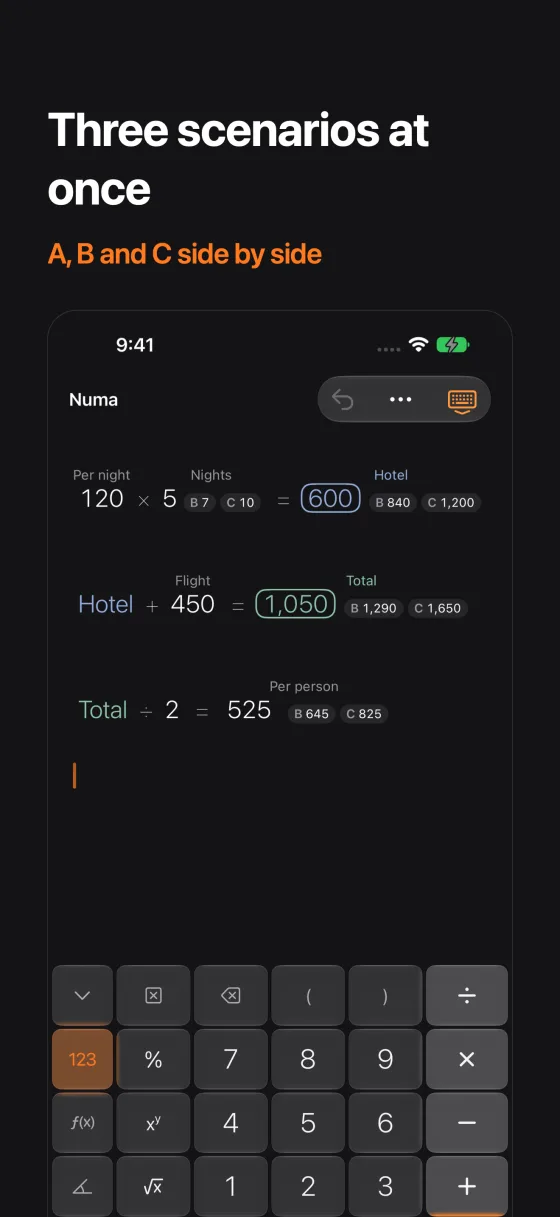
- Up to three scenarios (A, B, C) per number
- Numa works through every scenario and shows the results side by side
Graphs
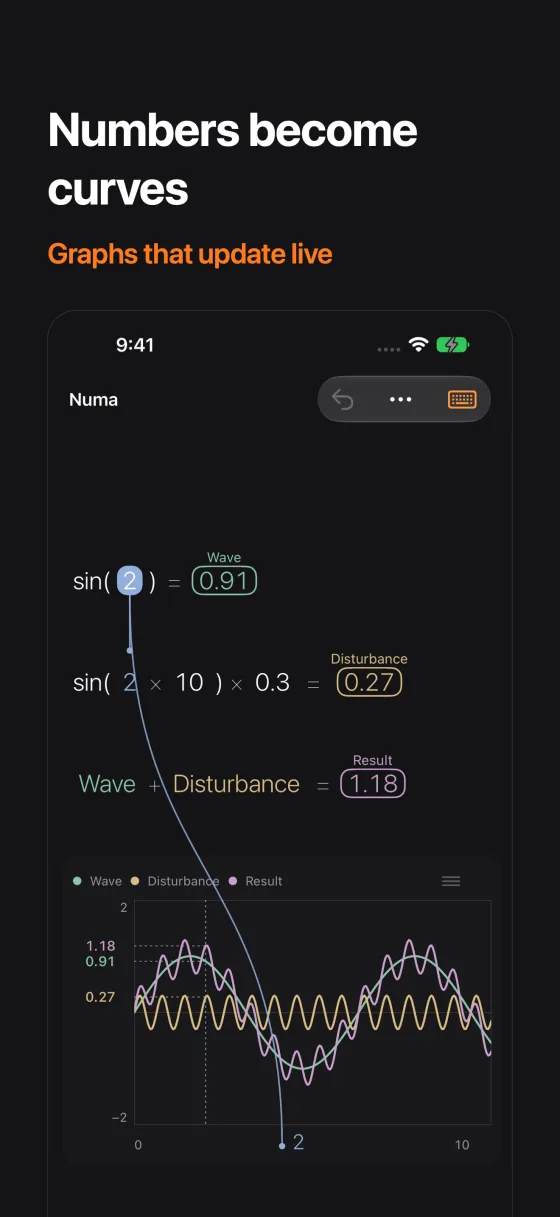
- A number becomes x, the result of its line becomes the curve
- Drag more numbers into the graph: bottom for x, above for a curve
- Crosshair for reading values
- Adjustable limits
- Moves live with the slider
- Share as an image
Over 30 functions
- + − × ÷ and percent the way you’d do it by hand: 78 + 7% = 83.46
- Powers, x², x³, roots, factorial
- ln, log10, log2, e, π, random number, placeholder “?”
- abs, ceil, floor, mod, scientific notation (EE)
- sin, cos, tan, sinh, cosh, tanh and their inverses
- In degrees or radians
Precision
- + − × ÷ use exact decimals: 0.1 + 0.2 = 0.3
- Rounding only for display, half away from zero
- Full precision underneath
- Thousands separators follow your region, such as 1,234.50
Units, dates and currencies
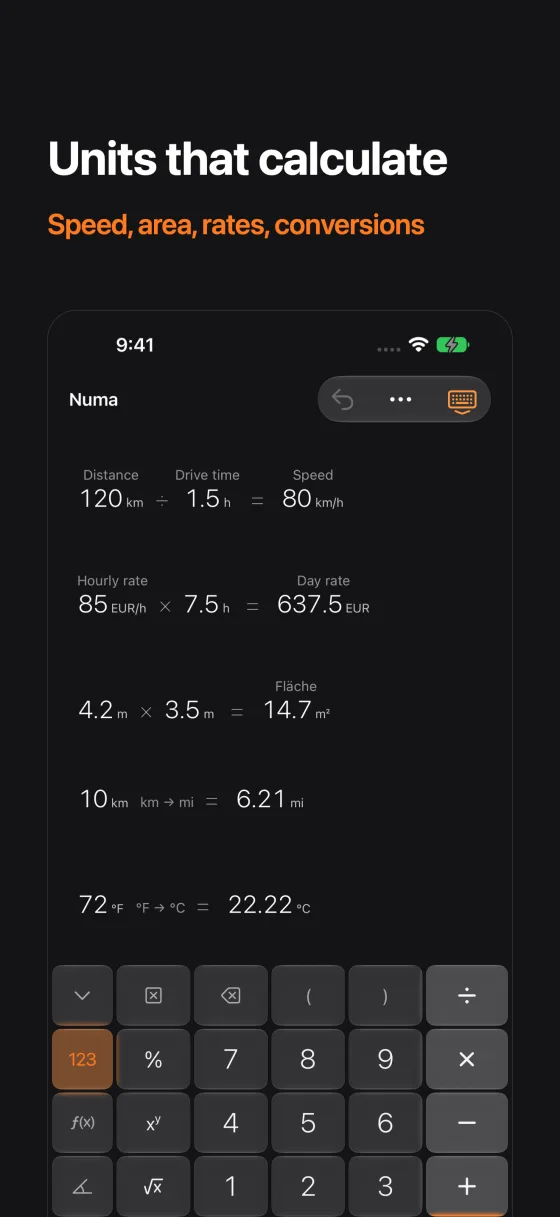
- Units calculate along: 120 km ÷ 1.5 h = 80 km/h
- Per unit, too: 120 CHF/h × 8 h = 960 CHF
- Length, weight, volume, area, temperature, speed, time, energy, data, angle
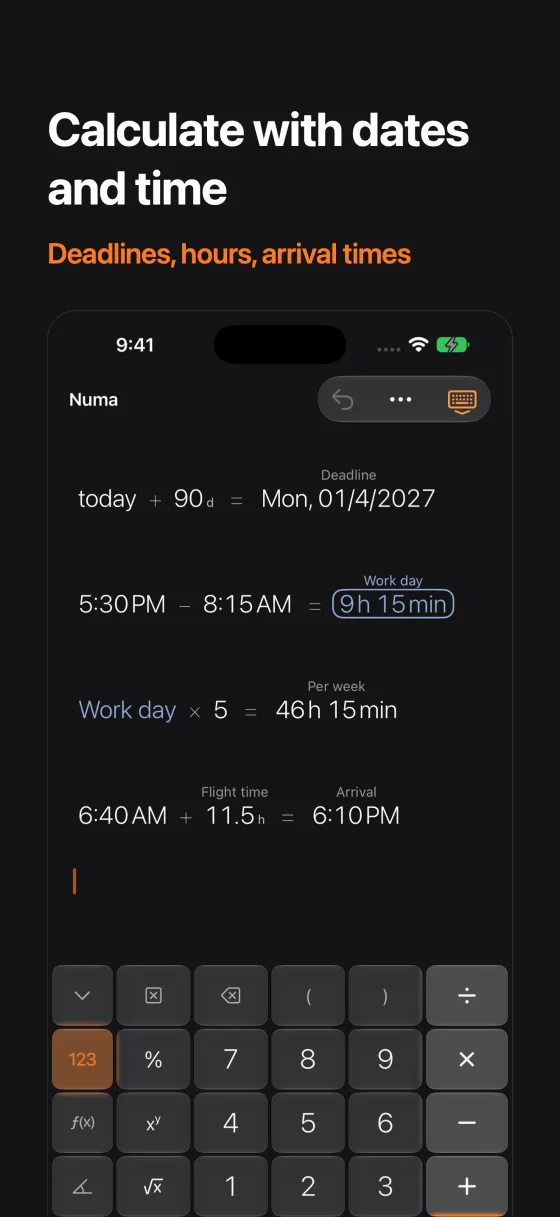
- Dates and times: today + 90 d, 17:30 − 08:15 = 9 h 15 min
- Workdays until a date
- 25 currencies with European Central Bank reference rates; the last rates work offline
Documents
- Multiple canvases as .numa documents
- In the Files app and iCloud Drive
- Saves automatically
- The last open canvas opens at launch
- Share as PDF, image or text
Input
- Capture numbers with the camera (Live Text) or from a photo
- Recognised on the device, images never leave it
- Drag and drop numbers, into other apps too
- Hardware keyboard: digits, + − * / ^ ( ) % ! and Return
Comfort
- Left-handed mode
- VoiceOver labels on every key and value
- Dynamic Type and a text size setting
- Dark mode
- Sounds and haptics can be switched off
Privacy in short
No account, no analytics, no server of ours. Your calculations stay on your device or in your iCloud Drive. Numa only downloads exchange rates when you convert currencies.
Questions and answers
What gets asked most. Everything else by email.
What does Numa cost?
Numa is free: the canvas, linking, names, sliders and all functions. Numa Pro is a one-time purchase, not a subscription, and unlocks graphs, units, dates and currencies, scenarios and the camera. The purchase works on all your devices with the same Apple Account and with Family Sharing.
Does Numa need an account?
No. There is no sign-in, no advertising and no tracking.
How do I link two values?
Select a result and press an operator. A linked number appears on the line below. Or drag one number onto another. To unlink, touch and hold and choose Unlink from the menu.
How do I calculate with names?
Label a number, say “Rent”. Then you can use the name in any calculation (keypad page More, Names): Rent × 12. When the rent changes, everything follows.
What are scenarios?
A number can have up to three values, A, B and C. Numa calculates the whole canvas for each scenario and shows the results of B and C next to those of A.
How does Numa calculate percent?
The way you’d do it by hand: 78 + 7% gives 83.46, that is 78 plus 7 percent of 78.
Why is 0.1 + 0.2 exactly 0.3?
Numa does + − × ÷ with exact decimals. Rounding happens only for display; full precision stays underneath.
Does Numa need the internet?
No. Only when you convert currencies does Numa download the European Central Bank reference rates, at most every 12 hours. The last rates stay on your device and work offline too.
Where are my calculations kept?
As .numa documents on your device or in your iCloud Drive. You’ll find them in the Files app. Numa saves automatically.
What happens to camera images?
Numa recognises the numbers on your device. The images are neither uploaded nor stored.
Can I use Numa with a keyboard?
Yes. Digits, + − * / ^ ( ) % ! and Return work on any hardware keyboard.
How do I delete everything?
Delete your .numa documents in the Files app, then delete the app. There is nothing on our side to delete.